Make a multiplayer card game - Episode 1 | Create a simple server and client from scratch
In the coming weeks, I'll be updating a series of tutorials on making a multiplayer online card games base on the rule of the most popular Chinese card game “Doudizhu”, which means battle with landlord. I divide this series in many small part to make it easy for most friends. If you know a little javascript, all the better.
Parts including:
- create a simple server and client
- play cards in terminal with bots
- communicate with server by protobuf
- play cards in terminal with other players
- create 2D graphical interface with Cocos Creator
- create 2D graphical interface with React
- create 3D graphical interface with Three.js
- add physical lib ammo.js to add a tiny game
- connect to Web3 world
open your terminal, input node -v, if something go wrong, please install node.js first https://nodejs.org.
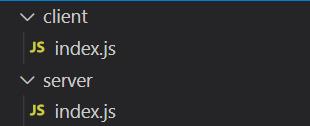
directory structure :
create a server, server/index.js:
 const net = require('net');

const server = net.createServer((socket) => {
    socket.on('data', (data) => {
        handlerData(socket, data)
    });
});

function handlerData(socket, data) {
    send(socket, {'msg':'Welcome, friend.'});
}

function send(socket, data) {
    let bufferData = Buffer.from(JSON.stringify(data));
    socket.write(bufferData);
}

server.listen(8080, () => {
    console.log("server listening on 127.0.0.1:8080")
});
create client, client/index.js:
const net = require('net');
const socket = new net.Socket();

socket.connect({
    host: '127.0.0.1',
    port: 8080
}, onConnected);

socket.on('data', (buffer) => {
    decode(buffer);
})
socket.on('error', (buffer) => {
    console.log(buffer);
});

function onConnected() {
    startGame();
}

function decode(data) {
    console.log(JSON.parse(data).msg);
}

function request(data) {
    const bufferData = Buffer.from(JSON.stringify({ 'msg': data }));
    socket.write(bufferData);
}

function startGame() {
    request('Hello, world!')
}
run :
cd server
node index.js
cd client
node index.js
result:

This episode is end here, the complete demo can be found on https://github.com/lizhiyu-me/Make-a-multiplayer-card-game/tree/episode1
Any problems, discussion is welcome.
In the next section, we will add the logic of Doudizhu game, and you will have completed a playable game in your terminal.
Thanks for your reading.