PureMVC | Prior for Episode 5
PureMVC will be included in next episode.
PureMVC is a framework for creating applications based upon the well-established model–view–controller (MVC) design pattern. The free, open source framework was originally implemented in the ActionScript 3 language for use with Adobe Flex, Flash and AIR, and it has since been ported to nearly all the major web development platforms.
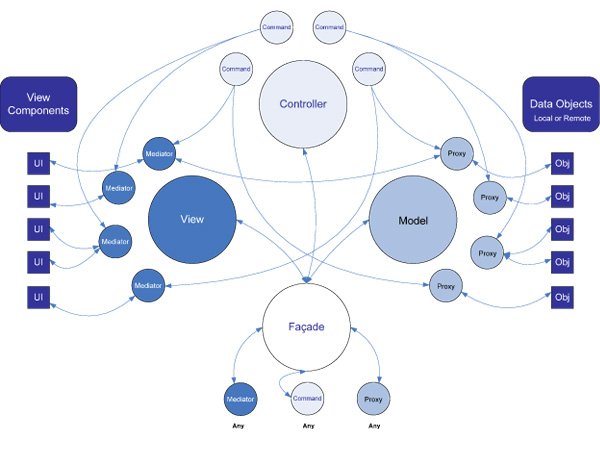
Advantages and disadvantages of PureMVC:
Advantages
Use intermediaries, agents and commands to realize decoupling, which reduces the coupling among model, view and controller and improves the reuse of some codes
The view interface can be reused
Model data can be reused
Disadvantages
Code redundancy is large. For simple functions, you have to create view, mediator, command, facade, proxy and model scripts
The operation process is a cumbersome process, and the code in mediator will appear complex and difficult to understand, unless you are familiar with the implementation principle of PureMVC
PureMVC features
- The notice shall be delivered through the operation of packing and unpacking
- The command / notification is implemented in the observer mode. The command / notification uses the reflection acquisition method in the observer and is executed
- No service (this module for network communication can be added according to the structure of MVC)
- Data is transmitted through notification. Sendnotification has only one object type parameter. It will feel that the data transmission is limited. You can combine the data into a type / structure for transmission, or expand another parameter for notification.