Make a multiplayer card game - Episode 2 | Play cards in terminal with bots
Before the tech content, I can't help but express my feeling after writing my first blog post.
I have learned a lot from writing blog. I will never understand the benefits contained in it before I wrote the first blog.
The output of the content will prompt you to review the known knowledge. In the process of reviewing the known knowledge, you will comprehend new cognition from the old knowledge by sorting out and summarizing the knowledge. In order to make it easier for readers to understand, you will understand the previously vague knowledge points by learning new knowledge.
At the same time, I began to understand the author's gratitude to his family in the preface of the book. Content output is a time-consuming and labor-intensive thing that requires a high degree of concentration.
If you are a developer and have not started your own blog writing, it is recommended to start now, no matter the content is good or bad, take the first step and feel the magical power of the output of the content.
Based on the server and client we had create in the previous episode, we concentrate on the logic of game process flow this time. For easy understanding, we ignore some process such as calculating score which we will supplement in the multi player version.
First of all, have a look at the new directory structure:
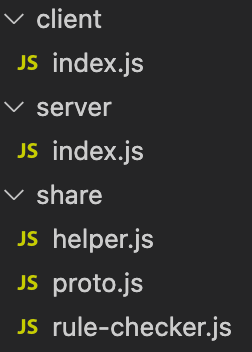
As we can see above, we add a directory named share, which will be use by both client and server.
helper.js for common logic.
proto.js for message definitions.
rule-checker.js for rule of our card game "Doudizhu".
- Define messages between client and server.
share/proto.js:
function generateEnum(protoArr) {
    let _enum = {};
    for (let i = 0; i < protoArr.length; i++) {
        const _protoName = protoArr[i];
        const _cmdID = i;
        _enum[_enum[_protoName] = _cmdID] = _protoName;
    }
    return _enum;
}

const ENUM_CMD_FN = generateEnum(
    [
        "ready_C2S",
        "dealCards_S2C",
        "competeForLandLordRole_C2S",
        "playTurn",
        "playCards_C2S",
        "playCards_S2C",
        "notAllowedByRule_S2C",
        "gameEnd_S2C"
    ]);

module.exports = { ENUM_CMD_FN: ENUM_CMD_FN }
The codes above create a enum like structure, which make the communication intuitive. We define the function in client and server with the same name created in it.
We encode message by the cmdID. server/index.js:
function encodeData(cmd, data){
    let _header = Buffer.alloc(1);
    _header.writeUInt8(cmd);
    let _body = Buffer.from(JSON.stringify(data));
    const _dataBuffer = Buffer.concat([_header, _body]);
    return _dataBuffer;
}
And decode message by cmdID to find the function to execute. server/index.js
function decodeData(data) {
    let _cmd = data.readUInt8();
    let _body = JSON.parse(data.slice(1));
    const _funcName = ENUM_CMD_FN[_cmd];
    if (_funcName && typeof _this[_funcName] == "function") _this[_funcName](_body);
}
Caution: the function called through _this[_funcName] must be define as:
this.dealCards_S2C = function (data) {
    let _cards = data.cards;
    mCardsArr = sortByValue(_cards);
    let _myHandCardsShowArr = convert2ReadableNames(mCardsArr);
    console.log('Deal cards complete, your seat number is-> ', data.seatNumber, 'your cards->', _myHandCardsShowArr.join(','));
    console.log('Select a score to confirm role (you can input 1|2|3, the one who select the biggest number will be the land lord, and the base score is the selected number.): ');
    const _score = getInputFromCmd();
    this.competeForLandLordRole_C2S(_score);
}
define like function dealCards_S2C(), can not be found.
The key point of this episode is all above, other codes are all about the game process flow and rules which has introduce in my previous post. If you has interest in this game, please clone the demo and play with the bots.
The complete demo can be found on: https://github.com/lizhiyu-me/Make-a-multiplayer-card-game/tree/episode2
Any problems, discussion is welcome.
In the next episode, we will add the protobuf.js which is most popular in game development to define our messages between client and server.
Thanks for your reading.